
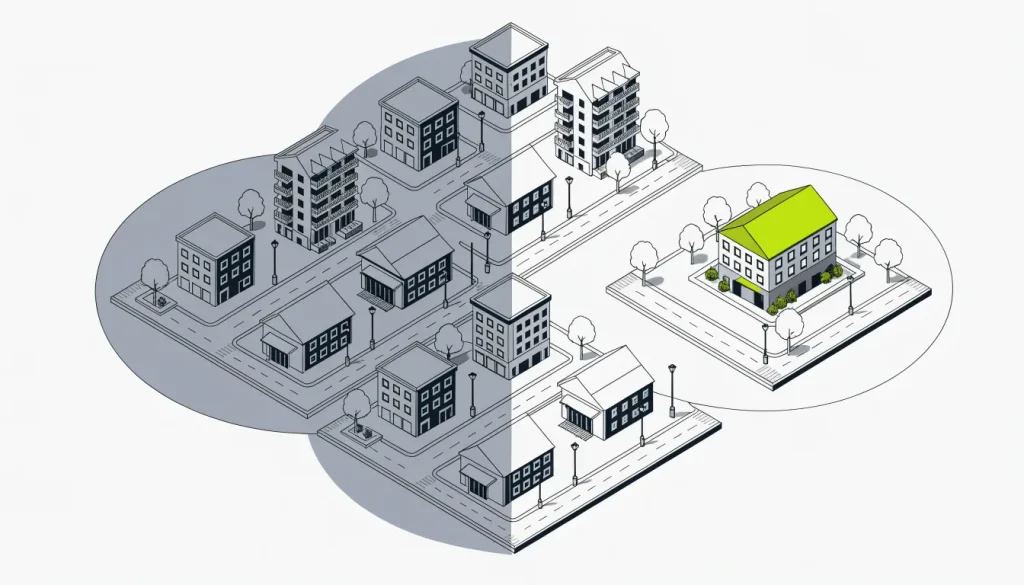
Geofencing vs geotargeting in brief
The short answer is scale and signal. Geotargeting shows different content or ads to people based on their location, which can be a country, region, city, ZIP code, IP address or internet provider. Geofencing sets a virtual boundary around a particular place, such as a store or a competitor’s lot.
Geotargeting often relies on IP addresses or account settings. Geofencing relies on the phone’s own position, which is usually far more precise. Google recommends a geofence radius of at least 100–150 m, while IP lookups tend to be dependable only for the country.
That makes geofencing the finer-grained of the two. It also makes it narrower in reach. A business chooses between them, or uses both, based on how tightly it needs to focus.
Steps for choosing between the two methods
A business owner can choose between the two methods by working through a short sequence of decisions. The steps start with the goal and end with checking the platform’s real settings. Each step narrows the choice.
-
Name the goal. Decide whether the aim is to reach a whole service area or the people at one place. A citywide goal points to geotargeting, and a single-site goal points to geofencing.
-
Map the area. Mark the cities, ZIP codes or radius the business serves. For a single site, mark the exact property or the competitor location in question.
-
Check the size limits. Google Ads will not accept a radius under 1 km, and it warns that ads in very small areas can appear on and off. On Meta, a custom radius can run from 0.63 to 50 miles.
-
Compare the size with the precision. A geofence radius below about 100–150 m works against the phone’s own error. Part 1 of this series sets out the precision of each method in more depth.
-
Choose who counts as “in” the area. In Google Ads, the default “Presence or interest” setting reaches people in or regularly in a place plus people interested in it. “Presence” reaches only people in or regularly there.
-
Check category rules. On Meta, advertisers in housing, jobs or credit lose ZIP targeting and area exclusions and must keep a minimum radius. Some businesses will find their options narrowed before they begin.
-
Pick the platform. Search and display platforms offer area targeting directly. Place-based fences are usually sold by vendors who work with app location data.
-
Review the results. Look at where viewers were placed and adjust the area. Expect some reach to fall just outside the chosen boundary.
Most businesses end up with a broad area as the base. A tighter fence around a specific place is added only when there is a clear reason.
A worked example: two tools, one campaign
Picture a roofing company that serves one county and a garden center that sits beside a larger rival. The roofer needs to reach homeowners across the whole county. Area targeting by county or ZIP code fits that goal.
The garden center has a different aim. It wants shoppers who are already at the rival’s store. A fence around that one property fits better, as long as it respects the size floor.
Neither choice is fixed. The roofer might add a fence around a home show, and the garden center might also target its own ZIP code. The steps above simply show which method leads.
Factors that change which method works
Four factors decide whether a broad area or a tight fence gives the better result. They are the precision of the location signal, the platform’s settings, the rules for the business category, and the way people move. A change in any one can shift the choice.
The location signal
An IP lookup is usually trustworthy for the country and shakier below it. Each data vendor makes its own accuracy claims. That suits country or regional targeting well and street-level targeting poorly.
IP databases have known failure modes. A default-location change by MaxMind once put about 600 million IP addresses on one Kansas farmstead. Proxies and VPNs can also hide or fake where a user is.
Device signals are tighter. Android guidance from Google sets the practical floor for a fence at 100–150 m. Below that, the boundary is smaller than the phone’s own error.
The platform’s own settings
Google Ads works out location from a mix of account settings, device signals and past behavior. Google states that 100% accuracy is not assured. Defaults also matter, because “Presence or interest” reaches more people than “Presence” alone.
Some options have been removed. Advertisers can no longer target by “search interest” or exclude by “presence or interest” in Search, Display, Shopping and similar campaigns. Excluded areas now apply the “Presence” rule unless changed.
Meta offers two kinds of location. The “home” type uses the city on a profile, cross-checked with IP data and where friends live. The “recent” type draws on phone data.
Category rules
Rules differ by industry. Housing, employment and credit ads on Meta cannot use ZIP codes or exclusions. Meta also added a special category for financial products and services, required for US campaigns in early 2025.
The background explains the caution. HUD brought a Fair Housing Act charge against Facebook in 2019. Its complaint said housing advertisers could mark off whole neighborhoods on a map and leave them out.
How customers move
A service business whose customers stay home suits area targeting. A business whose customers gather at known places, such as a rival’s store, suits a fence. Reference sources note that geofencing is commonly used to reach shoppers near competitor locations.
The basics of what geotargeting is, including the kinds of area a platform accepts, are covered in a separate guide.
Mistakes when comparing place and area targeting
Most mistakes come from expecting one method to behave like the other. Owners assume area targeting is street precise, or that a fence can be drawn as small as they like. Others forget that defaults and category rules change the reach.
Treating an IP guess as an exact address. An IP lookup is strongest for the country. A city or street guess can be off.
Drawing a fence smaller than the signal allows. A boundary under about 100–150 m sits inside the phone’s own error margin. It will miss some visitors and catch some passersby.
Trying a tiny radius in Google Ads. Nothing under 1 km is allowed. Even small areas above that floor may get patchy delivery.
Leaving the default reach unchecked. “Presence or interest” also reaches people interested in an area. A local service business may want “Presence” instead.
Assuming ZIP codes are open to everyone. Housing, employment and credit ads on Meta cannot use them. Those advertisers must use a minimum radius.
Mixing up the two methods in vendor talks. Some sellers use the terms loosely. Ask whether an offer works from IP data, device data or a drawn boundary, and at what minimum size.
Relying on one method to prove visits. Neither area targeting nor a fence makes location exact. Results should be read as estimates, not as head counts.
Expecting a rank boost from location settings. Targeting decides who sees an ad, not where a site ranks. Local rankings in Google weigh how relevant, how close and how prominent a business is.
Showing search engines a different page. Changing content for visitors by region is normal. Serving search engines different content than people see is cloaking, which breaks most search engines’ guidelines.
Frequently asked questions
What is the difference between geotargeting and geofencing?
Geotargeting chooses audiences by broad areas such as country, city, ZIP code or radius, often from IP addresses or account data. Geofencing draws a boundary around one specific place and reacts to devices inside it. Geofencing is the finer-grained of the two.
When does a business need geofencing instead of geotargeting?
A business needs a fence when its goal is the people at one specific place, such as a rival’s store. Reference sources say geofencing is commonly used to reach shoppers near competitor locations. For a whole service area, geotargeting by city, ZIP code or radius is the usual fit.
What is a geofence site?
A geofence site is the place a boundary is drawn around, such as a store, a lot or a venue. Google recommends a geofence radius of at least 100–150 m around that site, because phone location has a margin of error.
How precise is IP-based location targeting?
IP-based location is usually reliable for the country and less so for a city or street. Accuracy claims differ between vendors, and VPNs or proxies can hide a user’s real location.
Next reading in the geotargeting hub
The geotargeting hub brings together guides on area targeting, IP lookups and place-based methods. It explains how platforms decide where a person is and what limits apply. Start from geotargeting explained to see the full series.